Puretools Features: Precision Prompt Engineering
The landscape of generative Artificial Intelligence is rapidly evolving, moving far beyond simple text-to-image or text-to-video commands. In this new era, the quality of your output is directly proportional to the precision of your input. Puretools is not just another AI prompt generator; it is the definitive Prompt Engineering Tool built for professionals, creators, and developers who demand consistent, high-fidelity results from models like Midjourney, Stable Diffusion XL, and the latest video platforms.
1. Model-Specific Syntax Engines: The End of Generic Prompts
One of the most significant challenges in generative AI is the fundamental difference in how various models interpret language and syntax. A prompt optimized for Midjourney will often fail to produce the desired result in Stable Diffusion, and vice-versa. Puretools solves this with proprietary, model-specific syntax engines that translate your creative concept into the exact technical language required by the target platform.
1.1. Midjourney Prompt Generator (V6.1 Optimization)
Midjourney V6.1 thrives on fluid, natural language combined with specific technical constraints. Our Midjourney Prompt Generator ensures compliance and maximizes quality by focusing on:
- Cinematic Language Enforcement: We translate simple adjectives into evocative, artistic terms. For example, "good lighting" becomes "volumetric rim lighting" or "dramatic chiaroscuro," which the model is trained to recognize and execute with precision.
- Mandatory Parameter Inclusion: Critical parameters, such as --v 6.1 for the latest model version or --ar 16:9 for cinematic aspect ratios, are automatically included and correctly formatted, eliminating common user errors.
- Style Control and Consistency: Features like the automatic addition of --style raw are used to ensure photorealistic control, preventing the model from applying its default, often overly stylized, aesthetic.
- Clean Syntax and Flow: Midjourney favors descriptive prose over verbose punctuation. Our engine optimizes the prompt flow to ensure maximum readability and interpretation by the model, leading to more predictable and higher-quality images. This feature is crucial for anyone looking to master how to write better Midjourney prompts.
1.2. Stable Diffusion XL (SDXL) Prompt Optimization
Stable Diffusion XL (SDXL) operates on a different principle, requiring a structured, weighted approach to prioritize elements. Our Stable Diffusion Prompt Tool ensures your prompts are powerful and effective by:
- Keyword Weighting: We implement prompt weighting syntax, such as (masterpiece:1.3) or [photorealistic:1.2], to explicitly tell the model which elements are most important. This is a game-changer for achieving artistic consistency and quality.
- Strict Component Order: The prompt is structured into a logical flow: [Quality], [Style], [Subject], [Action]. This systematic approach ensures the model processes the instructions in the most effective sequence, a key element of advanced prompt engineering.
- Dedicated Negative Prompting: Instead of burying negative instructions in the main prompt, Puretools separates unwanted elements into a clean, dedicated Negative Prompt list. This dramatically improves the model's ability to exclude specific artifacts, distortions, or unwanted subjects.
1.3. Gemini and Nano Banana (Natural Language Processing)
For models like Google Gemini and Nano Banana, which excel at interpreting complex, natural language, Puretools acts as a sophisticated translator. It takes your structured input and weaves it into a perfectly categorized, cohesive narrative that leverages the model's advanced understanding, ensuring the highest quality output from these cutting-edge platforms.
1.4. The Puretools Difference: Precision Prompting in Action
Why settle for "good enough" when you can achieve perfection? The power of Puretools lies in its ability to transform vague concepts into hyper-detailed, model-specific instructions. We don't just generate text; we engineer a flawless technical blueprint for your chosen AI.
Observe the dramatic difference in output quality when using a simple, generic prompt versus a professionally engineered prompt from Puretools:
Subject: Mona Lisa
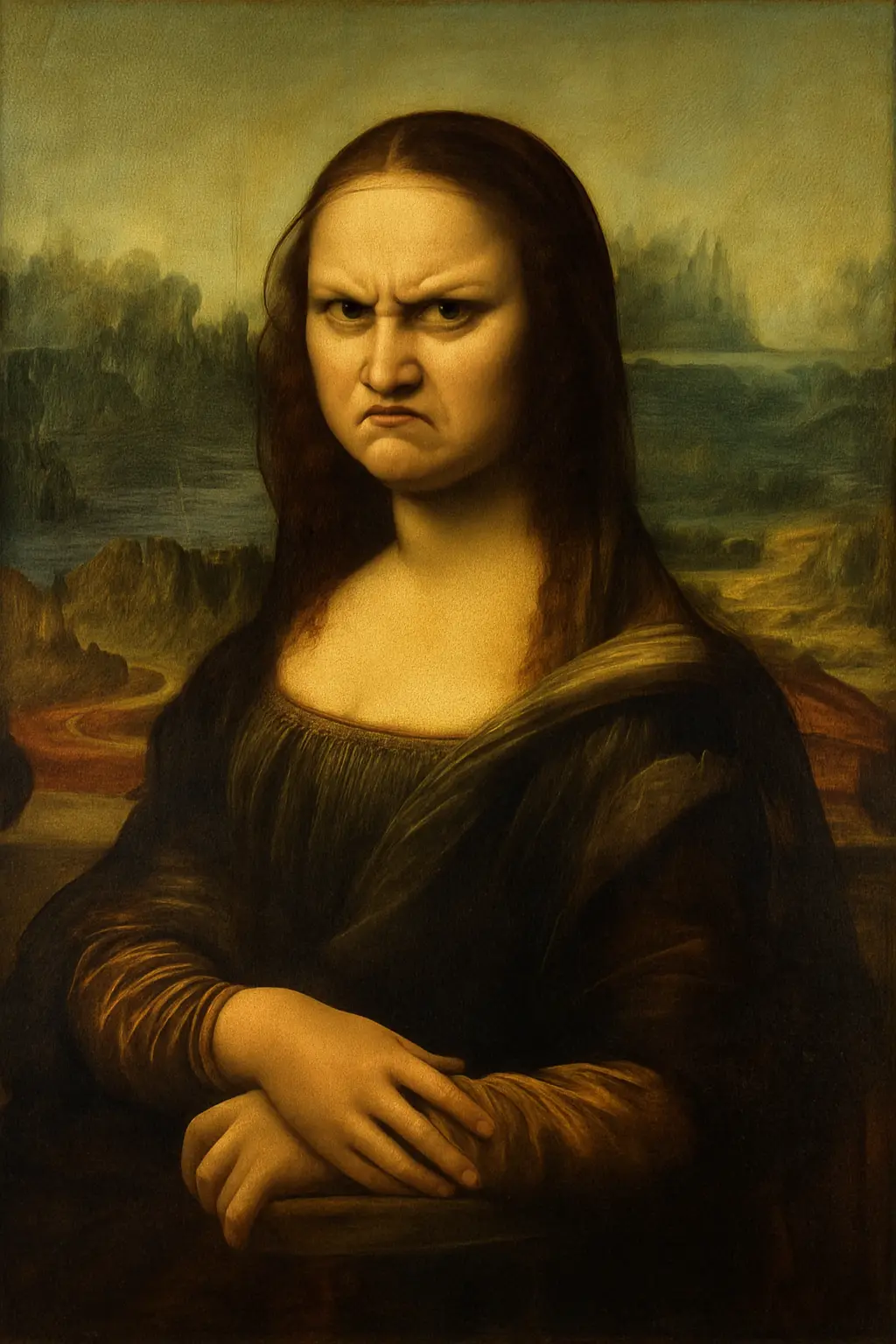
Simple Prompt Result
"create an image of Mona Lisa with angry face"
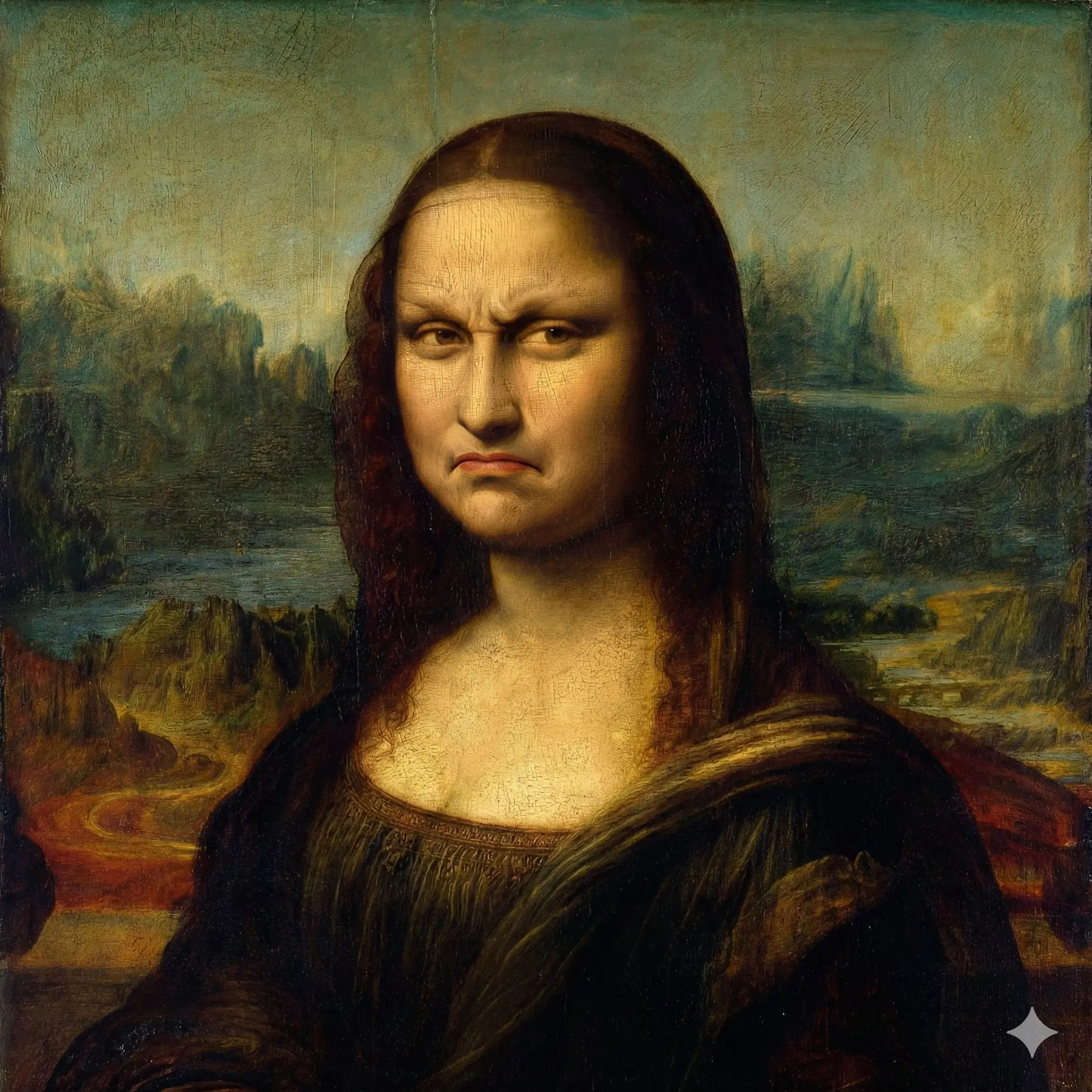
Puretools Prompt Result
"Mona Lisa portrait, angry expression, furrowed brow, intense gaze, in the style of Leonardo da Vinci, classic sfumato landscape background. Dramatic chiaroscuro lighting, deep shadows, Renaissance masterwork. Highly detailed oil painting, rich textures, expressive brushstrokes, museum quality art. --ar 1:1 --s 250 --v 6.1"
Subject: Nikola Tesla
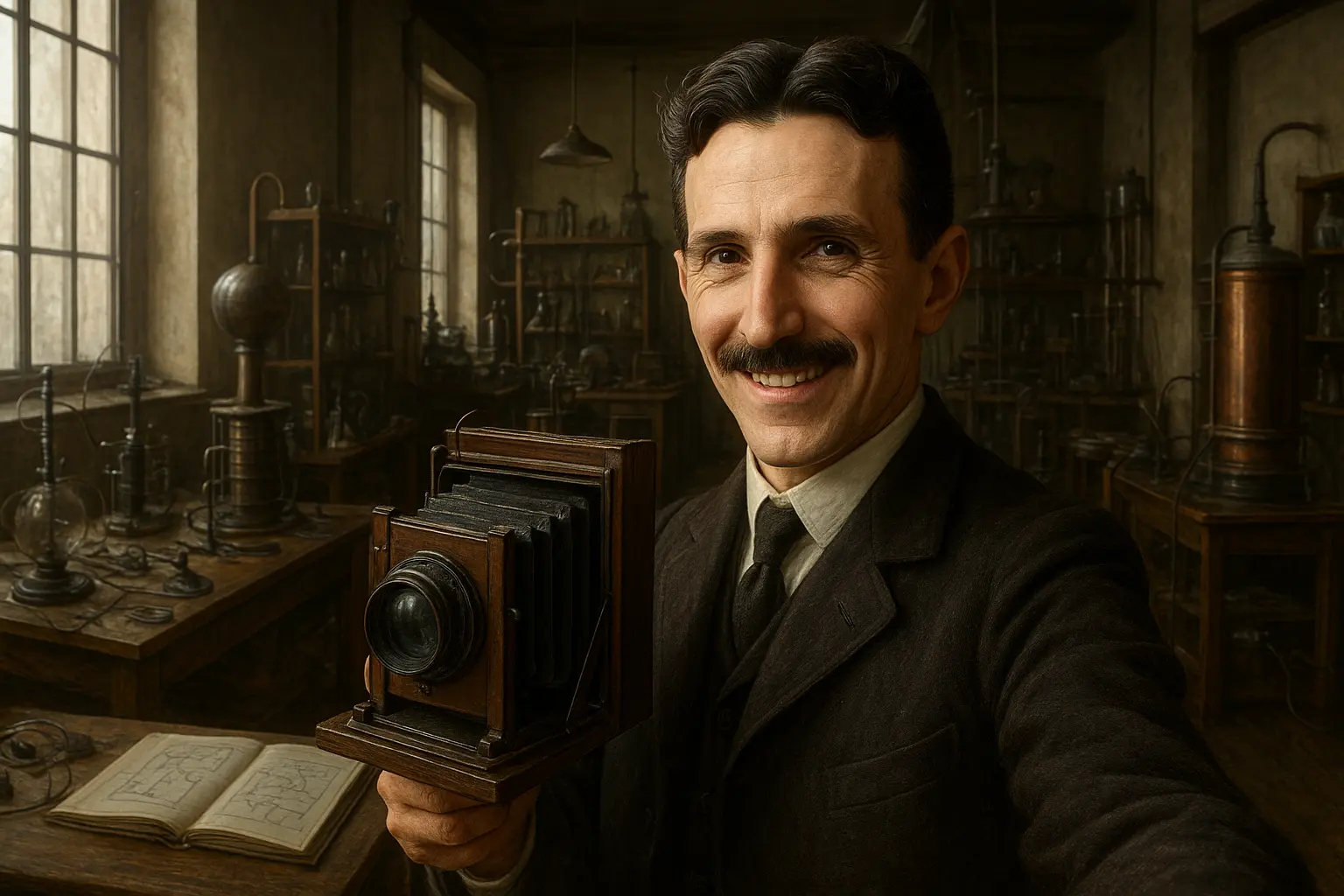
Simple Prompt Result
"Nikola Tesla sitting in his lab posing for selfie towards the camera, smiling"
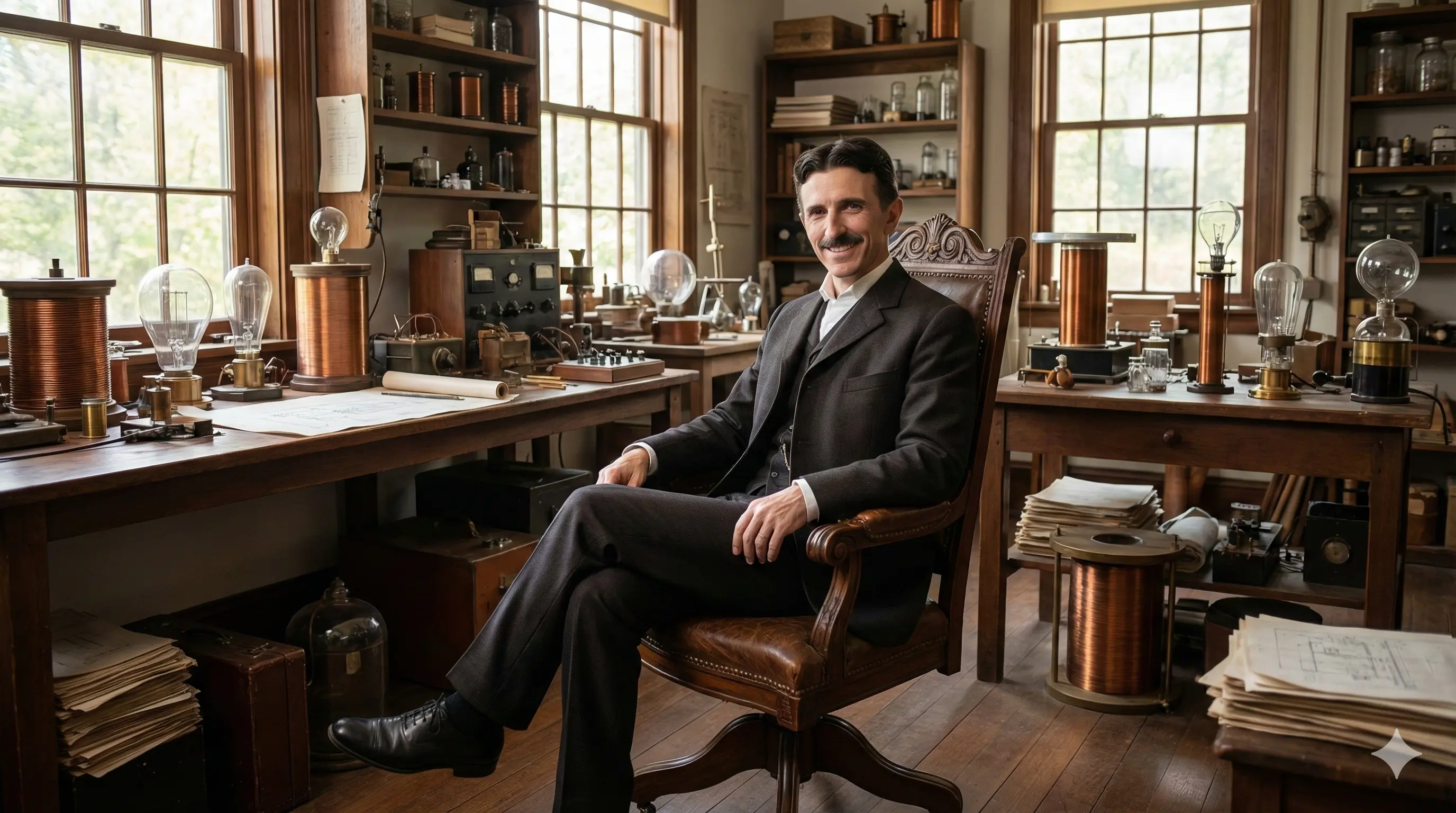
Puretools Prompt Result
{
  "meta": {
    "task": "image_generation",
    "target_model": "nano-banana",
    "complexity": "standard"
  },
  "scene": {
    "main_subject": "A wide-angle photograph capturing the brilliant inventor Nikola Tesla...",
    "action": "He maintains a relaxed yet poised posture...",
    "environment": "The backdrop is his iconic, bustling laboratory...",
    "time_and_atmosphere": "The entire laboratory is bathed in the clear, steady light..."
  },
  "visuals": {
    "art_style": "ultra_photorealistic",
    "lighting": "The natural daylight provides soft, even illumination...",
    "color_palette": "The color palette is remarkably vibrant...",
    "composition": "The image is framed as a wide-angle establishing shot...",
    "camera": {
      "type": "Professional DSLR Camera",
      "movement": "Static, Eye-level",
      "lens": "24mm wide-angle prime lens"
    },
    "effects": "The image possesses razor-sharp focus throughout..."
  },
  "technical": {
    "aspect_ratio": "16:9",
    "quality_tags": ["masterpiece", "highest quality", "ultra high resolution", "hyperdetailed"]
  },
  "constraints": {
    "negative_prompt": "No visible anachronisms, fantastical elements..."
  }
}
Subject: Sparrow
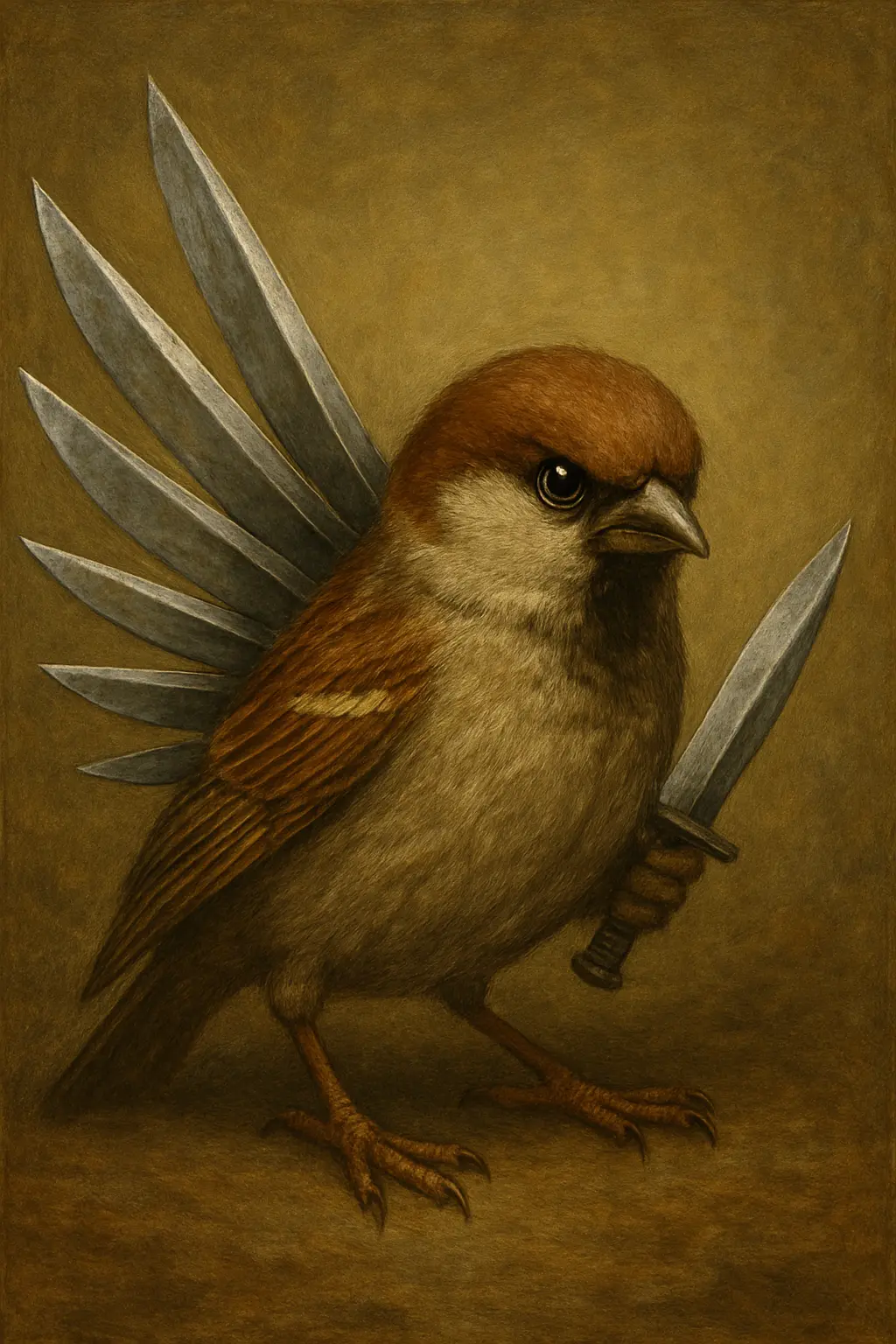
Simple Prompt Result
"create an image of sparrow with blades"

Puretools Prompt Result
{
  "meta": {
    "task": "image_generation",
    "target_model": "nano-banana",
    "complexity": "standard"
  },
  "scene": {
    "main_subject": "A wide-angle cinematic photograph showcasing a small, agile sparrow...",
    "action": "The sparrow is captured in a stunning display of mid-air suspension...",
    "environment": "Beneath the hovering bird, a vast and vibrant grassy field extends...",
    "time_and_atmosphere": "The entire scene is bathed in the crisp, bright, and even illumination..."
  },
  "visuals": {
    "art_style": "cinematic_photography",
    "lighting": "Natural Daylight",
    "color_palette": "Cool Cybernetic, featuring dominant cool blues...",
    "composition": "The sparrow is artfully positioned using the rule of thirds...",
    "camera": {
      "type": "professional DSLR camera",
      "movement": "static, perfectly still shot",
      "lens": "85mm prime lens"
    },
    "effects": "A subtle yet pronounced depth of field..."
  },
  "technical": {
    "aspect_ratio": "16:9 cinematic widescreen",
    "quality_tags": ["ultra-realistic", "hyper-detailed", "photorealistic"]
  },
  "constraints": {
    "negative_prompt": "cartoon, illustration, low quality, blurry..."
  }
}
2. Director-Level Control: The Video Prompt Engine
The emergence of text-to-video models like Sora and Gemini Veo has opened up new creative frontiers. However, generating cinematic-quality video requires more than just a description of the scene; it requires explicit directorial control. The Puretools Video Prompt Engine is the first AI prompt generator to offer this level of precision.
2.1. Cinematic Direction and Temporal Pacing
Our engine focuses on the elements of motion and time, which are critical for video generation:
- Explicit Camera Control: Users can mandate specific, professional camera movements, such as a "smooth cinematic pan left," a "slow dolly zoom," or a "crane shot descending." This feature eliminates the vague, often jarring movements produced by simple prompts.
- Temporal Continuity: We help structure the prompt to maintain consistency across the specified duration, ensuring the subject, lighting, and environment remain coherent throughout the clip.
- Pacing and FPS: Define the frames per second (FPS) and overall pacing (e.g., "slow motion," "hyper-lapse") to achieve the desired emotional and visual effect.
2.2. Integrated Production Elements
Beyond the visual, the Video Prompt Engine allows for the specification of integrated production elements:
- VFX Injection: Specify special effects, post-production looks, and overlays (e.g., "vintage film grain overlay," "lens flare effect," "digital glitch").
- Integrated Soundscape: While the AI may not generate the audio, structuring the prompt to include audio descriptions (e.g., "sound of distant traffic and a lone saxophone") helps the model conceptualize the full scene, leading to better visual results.
3. Structured JSON Outputs: The Developer’s Prompt Engineering Tool
For developers and enterprises building AI applications, the output of a prompt generator must be predictable and machine-readable. Puretools is the only AI prompt generator that can structure your creative concepts into semantic JSON Schemas, transforming creative ideas into actionable, structured data for generative AI.
3.1. Perfect for Automated Workflows
This feature is invaluable for:
- API Chains: Feeding structured, categorized data directly into subsequent API calls or microservices.
- RAG Systems: Providing a perfectly categorized data set (e.g., Lighting, Composition, Subject) that can be used for retrieval-augmented generation.
- Complex App Integration: When building an AI application, you need to ensure that the prompt generated is not just a string of text, but a data object that your application can parse and utilize.
3.2. Example of Structured Output
Instead of a raw text string, Puretools delivers a categorized data object, ensuring every element of your creative vision is accounted for:
{
  "task": "image_generation",
  "model": "Stable Diffusion XL",
  "subject": "A futuristic cityscape at night",
  "aesthetic_style": "Cyberpunk Neon",
  "lighting": "Dramatic Rim Light",
  "composition": "Wide Angle (Establishing)",
  "negative_prompt_elements": [
    "blurry",
    "low resolution",
    "watermark"
  ]
}
This structured approach is the future of prompt engineering, enabling seamless integration into enterprise-level solutions.
4. The Technology Behind the Precision: Elite System Prompting
The unparalleled quality of Puretools' output is rooted in its unique implementation of System Prompting, powered by the Gemini 2.5 Flash model. We don't simply ask the AI to "write a prompt"; we pre-load the API with a hyper-specific, multi-layered instruction set.
4.1. The Elite Persona
The underlying model is instructed to act as an "Elite Prompt Engineer"—a persona with a vast vocabulary of artistic, cinematic, and technical terms. This ensures that the generated prompt uses professional, industry-standard language, moving beyond the generic vocabulary that plagues other AI prompt generator tools.
4.2. Dynamic Constraint Checklist
Before generation, the system forces the AI to check off distinct components (Subject, Scene, Style, Lighting, etc.). This internal checklist acts as a quality control mechanism, ensuring that no crucial element of your input is overlooked or omitted from the final prompt.
4.3. Dynamic Rule Injection
Based on your selection of the target platform (Midjourney, SDXL, etc.), the system dynamically injects the specific rule sets for that model. This is how Puretools maintains its model-specific syntax integrity, ensuring that the AI adheres to the unique requirements of each generative platform.
5. User Experience and Data Privacy Features
A powerful prompt engineering tool must also be intuitive and secure. Puretools is designed with a simple, intuitive single-page interface that guides the user through the process, acting as a collaborative interface with the AI.
5.1. Guided Input for Enhanced Control
Instead of a single, intimidating text box, the interface features guiding input fields for:
By collecting these discrete pieces of information, the AI receives a perfectly categorized data set, allowing Puretools to seamlessly weave your vision into a cohesive, professional prompt.
5.2. Local First. Private Always.
In an age where data privacy is paramount, Puretools offers a commitment to security:
- Local-First Database: Your creative IP belongs to you. Your prompt library is stored securely in your browser's local storage. This means your ideas are never sent to the cloud or tracked by third parties.
- Offline Capable: Generate and refine prompts without an internet connection, ensuring uninterrupted workflow.
- JSON Export: You maintain full control over your data. Export your entire prompt database to JSON for backup, migration, or integration into other systems at any time.
Conclusion: Elevate Your Generative Workflow
If your goal is to consistently generate professional Midjourney prompts, cinematic video prompts, or structured Stable Diffusion prompts, Puretools is the essential prompt engineering tool for your workflow. It translates fleeting ideas into flawless technical commands, ensuring that your creative vision is executed with the precision it deserves. Stop wasting time on trial-and-error prompting and start achieving predictable, high-quality results today.